The Node.js Event Loop Explained
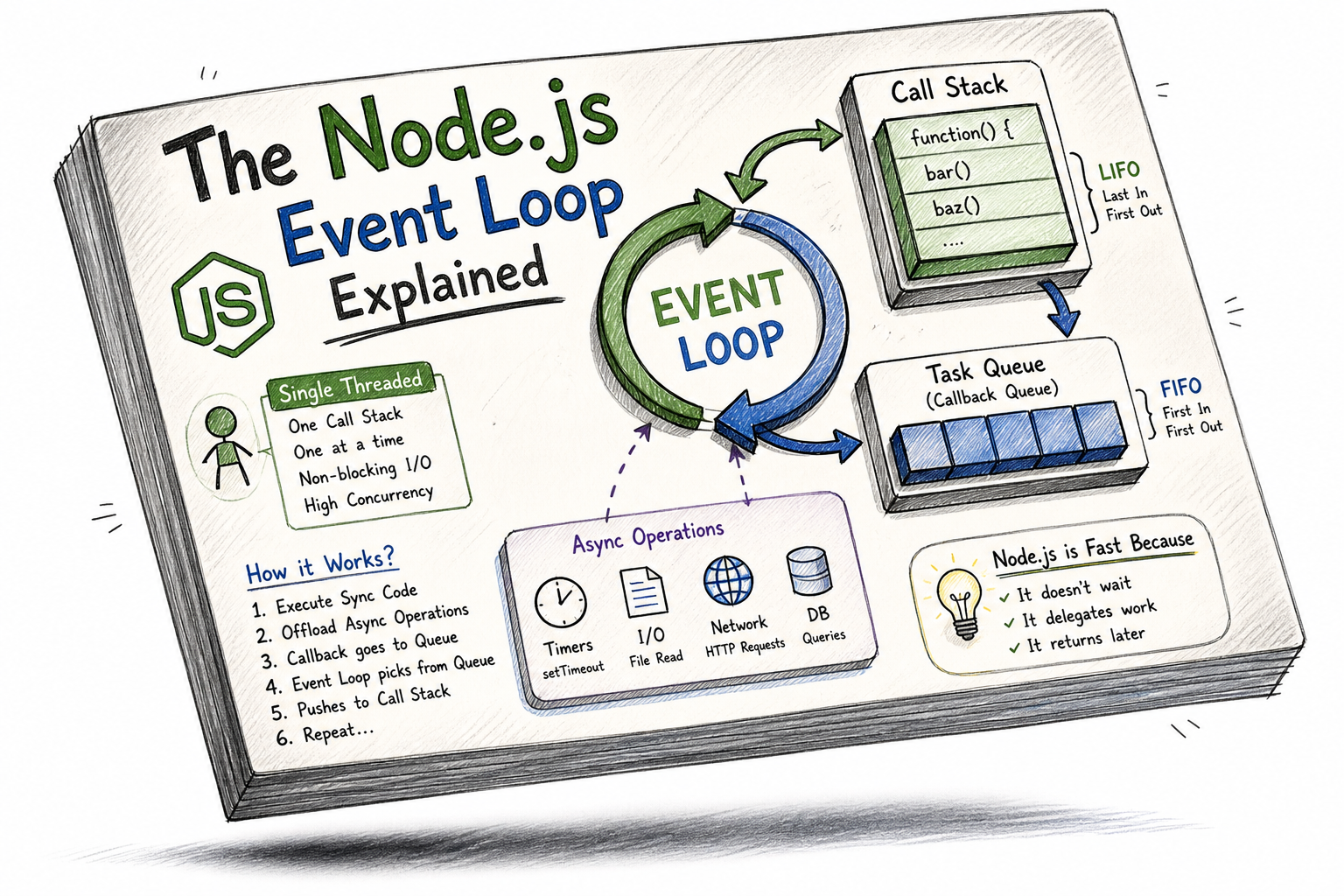
Modern backend systems are expected to handle thousands of concurrent users without slowing down. Yet Node.js runs on a single thread. That sounds like a limitation—until you understand the event loop.
This article breaks down the Node.js event loop from first principles and gradually builds toward real-world scalability insights. If you truly understand this, you’ll stop “using Node.js” and start thinking like Node.js.
1. The Single-Thread Reality
Let’s begin with the uncomfortable truth.
Node.js is single-threaded for JavaScript execution.
That means:
One call stack
One task executing at a time
No parallel execution of JS code
So the natural question is:
How does Node.js handle thousands of requests simultaneously?
The answer is not threads.
The answer is the event loop.
2. What is the Event Loop?
Think of the event loop as a smart task manager.
It continuously:
Checks if the call stack is empty
Picks the next task from the queue
Pushes it into the call stack
Executes it
And it does this forever.
3. Mental Model: Call Stack + Task Queue + Event Loop


Core Components
Call Stack
Executes functions
LIFO (Last In First Out)
Task Queue (Callback Queue)
Stores async callbacks
FIFO (First In First Out)
Event Loop
- Moves tasks from queue → stack
4. Why Node.js Needs the Event Loop
Without the event loop, Node.js would behave like this:
readFile("data.txt"); // blocks everything
console.log("Done");
Execution would pause until the file is fully read.
That means:
No other request can be handled
Server becomes slow
Scalability dies
With Event Loop
Node.js delegates slow operations to the system:
fs.readFile("data.txt", () => {
  console.log("File read");
});

console.log("Done");
Output:
Done
File read
Why?
Because:
File reading happens outside JS thread
Callback goes into queue
Event loop schedules it later
5. The Queue Analogy (Real-World Thinking)
Imagine a restaurant:
Chef = Call Stack
Orders = Tasks
Order Queue = Task Queue
Manager = Event Loop
The chef only cooks one dish at a time.
But the manager keeps:
Taking new orders
Scheduling next dish
Ensuring nothing blocks the chef
That’s exactly how Node.js works.
6. How Async Operations Actually Work
Let’s break a real example step-by-step:
console.log("Start");

setTimeout(() => {
  console.log("Timer Done");
}, 1000);

console.log("End");
Execution Flow
console.log("Start")→ runs immediatelysetTimeout→ registered in Web APIsconsole.log("End")→ runs immediatelyAfter 1 second → callback enters queue
Event loop → pushes callback to stack
"Timer Done" executes
Output
Start
End
Timer Done
7. Timers vs I/O Callbacks (High-Level View)
Not all async tasks are equal.
Timers (Time-Based)
setTimeoutsetInterval
They depend on time delay
I/O Callbacks (Data-Based)
File reading
Database queries
Network requests
They depend on external completion
8. Visualizing Execution Cycle


Simplified Cycle
Execute all sync code
Check queue
Move one task to stack
Execute it
Repeat
This loop never stops.
9. Important Insight: Async ≠ Parallel
This is where many developers get confused.
Node.js does NOT run your JS in parallel.
Instead:
It offloads work
Then handles results later
So it achieves:
High concurrency
Without multiple JS threads
10. Advanced Example: Mixed Async Tasks
console.log("A");

setTimeout(() => console.log("B"), 0);

Promise.resolve().then(() => console.log("C"));

console.log("D");
Output
A
D
C
B
Why?
Order of priority:
Call stack (sync)
Microtasks (Promises)
Macrotasks (Timers)
This subtle difference is what separates average devs from strong engineers.
11. Event Loop and Scalability
Here’s the real power.
Traditional Thread-Based Servers
One thread per request
Memory heavy
Context switching cost
Node.js Model
Single thread
Non-blocking I/O
Event-driven
Result:
Handles thousands of connections
Minimal memory overhead
High throughput
12. Real Business Use Case
Imagine a chat application:
10,000 users connected
Each user sends messages
Messages stored in DB
Traditional Approach
- 10,000 threads → heavy system load
Node.js Approach
Single thread + event loop
DB operations async
Event loop schedules responses
Result:
Faster response time
Lower cost infrastructure
Better scalability
13. Common Mistake That Breaks Everything
Blocking the event loop.
Example:
while(true) {}
This:
Blocks call stack forever
Event loop cannot run
Server freezes
Even this is dangerous:
for(let i = 0; i < 1e9; i++) {}
Lesson: Never write CPU-heavy code in main thread.
14. Pro-Level Thinking
To master Node.js:
Think in tasks, not threads
Avoid blocking operations
Use async APIs everywhere
Understand execution order deeply
When debugging: Ask yourself:
Is the stack busy?
Is the task in queue?
Is event loop waiting?
15. Final Mental Model
Node.js is not fast because it is powerful.
It is fast because:
It does not wait
It delegates work
It returns later
The event loop is the brain behind this system.
Closing Thought
If you truly understand the event loop, you stop writing code that “works” and start writing systems that scale.
That is the difference between a developer and an engineer.


