REST API Design Made Simple with Express.js
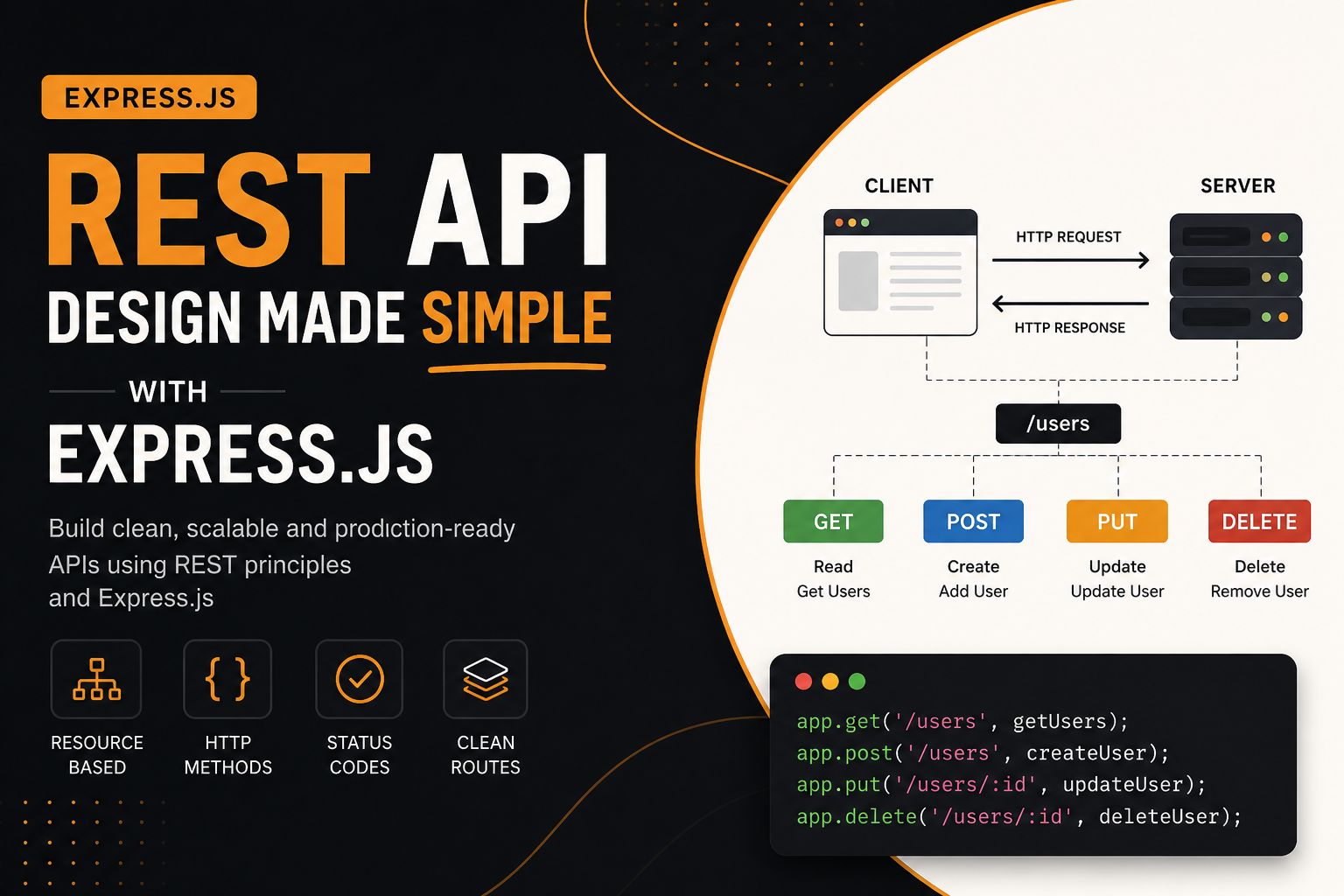
Modern applications live and breathe through APIs. Whether it’s a mobile app fetching user data or a frontend dashboard updating records, APIs act as the bridge between systems. Among various API styles, REST stands out because of its simplicity, predictability, and scalability.
This article walks you through REST API design using Express.js—from first principles to production-grade thinking—using a single resource: users. The goal is not just to build APIs, but to design them like a professional engineer.
Understanding REST: More Than Just Routes
REST (Representational State Transfer) is not a framework. It is an architectural style that defines how systems communicate over HTTP.
At its core, REST treats everything as a resource.
A resource can be:
A user
A product
An order
A file
Each resource is identified by a URL, and interactions happen using standard HTTP methods.
Think of REST like a disciplined conversation between client and server:
The client asks for something
The server responds with structured data
Both follow a shared set of rules
Client–Server Communication Simplified


A REST API follows a predictable lifecycle:
Client sends a request (GET /users)
Server processes it
Server sends a response (JSON + status code)
This simplicity is what makes REST powerful.
Resources: The Foundation of REST
In REST, everything revolves around resources.
Instead of thinking:
"I need an API to fetch user data"
Think:
"I have a resource called users"
This shift changes how you design APIs.
Resource Naming Rules
Use nouns, not verbs
Use plural names
Keep it consistent
Good:
/users
/products
/orders
Bad:
/getUsers
/createUser
/deleteUser
HTTP Methods = Actions
Each HTTP method defines what operation you are performing on a resource.
CRUD vs HTTP Mapping


| Operation | HTTP Method | Example |
|---|---|---|
| Read | GET | GET /users |
| Create | POST | POST /users |
| Update | PUT | PUT /users/1 |
| Delete | DELETE | DELETE /users/1 |
Setting Up Express (Minimal and Clean)
const express = require("express");
const app = express();

app.use(express.json());

app.listen(3000, () => {
  console.log("Server running on port 3000");
});
This is your base server. Everything else builds on top of this.
Designing a Users Resource
We will design a complete REST system around one resource: users
Data Example
let users = [
  { id: 1, name: "Rahul", email: "rahul@test.com" },
  { id: 2, name: "Anita", email: "anita@test.com" }
];
GET: Fetch Users
Get all users
app.get("/users", (req, res) => {
  res.status(200).json(users);
});
Get a single user
app.get("/users/:id", (req, res) => {
  const user = users.find(u => u.id === Number(req.params.id));

  if (!user) {
    return res.status(404).json({ message: "User not found" });
  }

  res.status(200).json(user);
});
POST: Create a User
app.post("/users", (req, res) => {
  const { name, email } = req.body;

  if (!name || !email) {
    return res.status(400).json({ message: "Missing fields" });
  }

  const newUser = {
    id: users.length + 1,
    name,
    email
  };

  users.push(newUser);

  res.status(201).json(newUser);
});
PUT: Update a User
app.put("/users/:id", (req, res) => {
  const user = users.find(u => u.id === Number(req.params.id));

  if (!user) {
    return res.status(404).json({ message: "User not found" });
  }

  user.name = req.body.name || user.name;
  user.email = req.body.email || user.email;

  res.status(200).json(user);
});
DELETE: Remove a User
app.delete("/users/:id", (req, res) => {
  const index = users.findIndex(u => u.id === Number(req.params.id));

  if (index === -1) {
    return res.status(404).json({ message: "User not found" });
  }

  users.splice(index, 1);

  res.status(204).send();
});
Understanding Status Codes (Simple but Powerful)
Status codes are not optional—they define the contract of your API.
| Code | Meaning |
|---|---|
| 200 | Success |
| 201 | Created |
| 204 | No Content |
| 400 | Bad Request |
| 404 | Not Found |
| 500 | Server Error |
Real Insight
A professional API is judged not by data, but by correct status usage.
REST Route Design Principles
1. Keep URLs Clean
Bad:
/api/getAllUsers
Good:
/users
2. Use Hierarchical Structure
/users
/users/1
/users/1/orders
3. Avoid Action Words
REST relies on HTTP methods, not verbs in URLs.
4. Consistency is Everything
If you use plural once, use it everywhere.
Request–Response Lifecycle Deep Dive


In a real-world system:
Request enters server
Middleware processes it (auth, validation)
Route handler executes logic
Database interaction happens
Response is returned
This layered architecture is what separates beginner code from production systems.
Moving Towards Production Thinking
Now let's step beyond basics.
Validation Layer
Never trust input:
if (!email.includes("@")) {
  return res.status(400).json({ message: "Invalid email" });
}
Separation of Concerns
Instead of writing everything in one file:
routes/
controllers/
services/
models/
This makes your API scalable.
Error Handling Middleware
app.use((err, req, res, next) => {
  res.status(500).json({ message: "Something went wrong" });
});
Versioning Your API
/api/v1/users
This prevents breaking existing clients when you upgrade.
Common Mistakes (And How Seniors Avoid Them)
Mixing verbs in routes
Ignoring status codes
Returning inconsistent response formats
Writing business logic inside route handlers
No validation layer
Senior engineers don’t just write working APIs—they design predictable systems.
Business-Level API Thinking
At scale, REST APIs are not just endpoints—they are products.
Consider:
Rate limiting
Authentication (JWT, OAuth)
Logging and monitoring
API documentation (Swagger)
Performance (caching, indexing)
The goal shifts from:
"Does it work?"
to:
"Can it scale and be trusted?"
Final Thought
REST API design is not about memorizing routes. It’s about thinking in resources, respecting HTTP semantics, and building systems that other developers can understand instantly.
When done right:
Your API becomes self-explanatory
Your system becomes scalable
Your code becomes maintainable
And that is the difference between writing code and engineering systems.


