Blocking vs Non-Blocking Code in Node.js
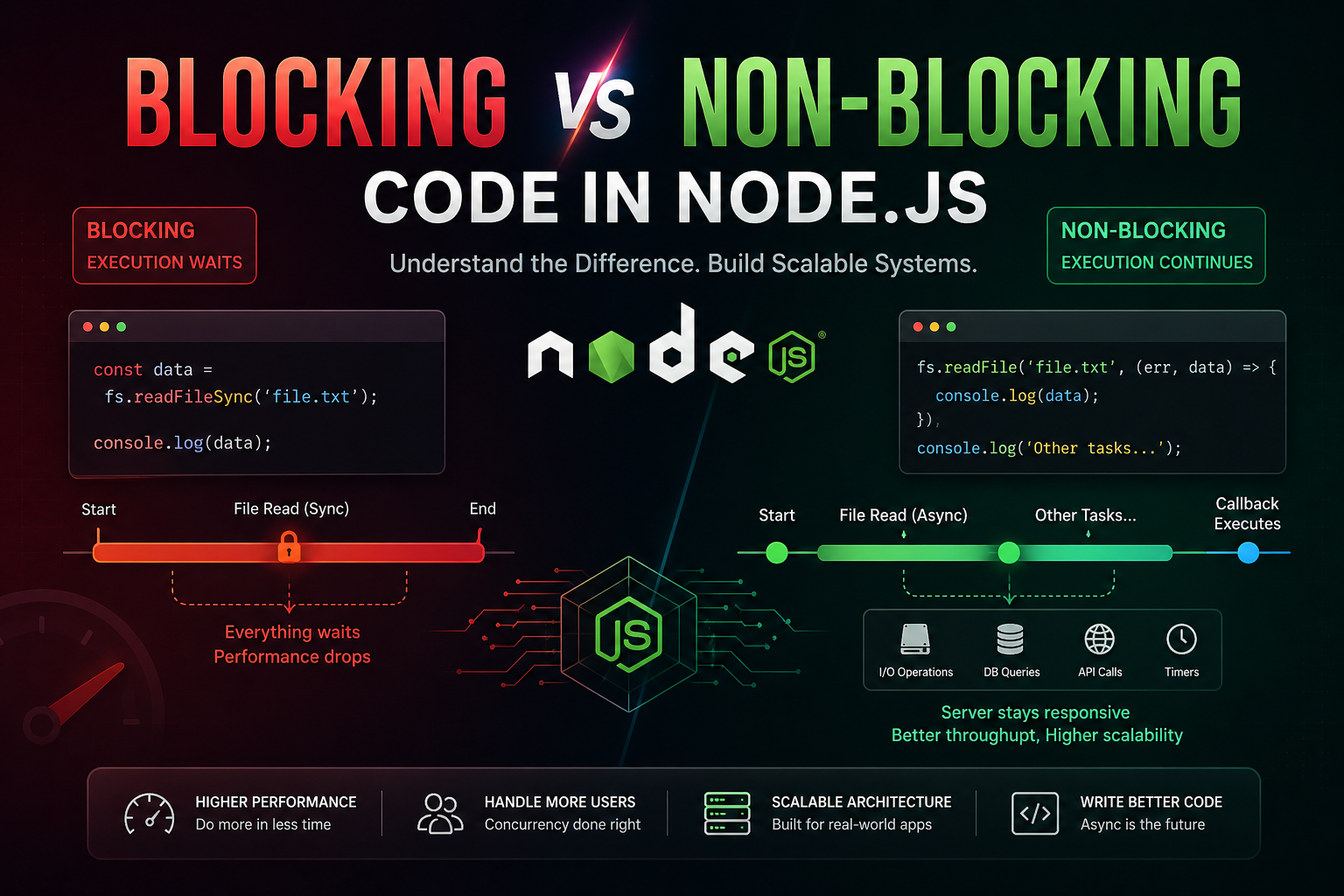
A deep, practical guide from fundamentals to production-grade thinking
Introduction
When developers first encounter Node.js, one phrase appears everywhere: “non-blocking, event-driven architecture.”
It sounds powerful. It is powerful. But unless you deeply understand what blocking and non-blocking code actually do at runtime, you’ll end up writing Node.js code that behaves like a slow, traditional server.
This article is not just definitions. We will move from:
Core mental models
Execution behavior
Real-world scenarios
Performance impact
Production-level patterns
By the end, you will think like a backend engineer, not just write code.
The Core Idea (Simple but Critical)
At its heart, Node.js runs on a single main thread.
That means:
One task runs at a time — unless you deliberately allow it to step aside.
This is where blocking vs non-blocking becomes everything.
What is Blocking Code?
Blocking code stops everything else from executing until it finishes.
Think of it like this:
You are cooking, and you decide:
“I will not do anything until the rice is fully cooked.”
So you stand there. Watching. Waiting. Doing nothing else.
That’s blocking.
Example: Blocking File Read
const fs = require('fs');

console.log("Start");

const data = fs.readFileSync('large-file.txt', 'utf-8');

console.log("File Loaded");
console.log("End");
Execution Flow
"Start" prints
Node reads the file (CPU waits)
Only after file is done → "File Loaded"
Then "End"
Blocking Execution Timeline


Notice:
Everything pauses during file read
No other request can be processed
What is Non-Blocking Code?
Non-blocking code starts a task and immediately moves on, allowing other operations to continue.
Real-life analogy:
You put rice on the stove and say:
“While it cooks, I’ll chop vegetables.”
Now you're efficient.
Example: Non-Blocking File Read
const fs = require('fs');

console.log("Start");

fs.readFile('large-file.txt', 'utf-8', (err, data) => {
    console.log("File Loaded");
});

console.log("End");
Execution Flow
"Start"
File read is initiated
Immediately → "End"
Later → "File Loaded"
Non-Blocking Execution Timeline


Notice:
File reading happens in background
Main thread continues
Callback runs later
The Real Engine: Event Loop
This behavior is powered by Node.js's Event Loop.
What actually happens:
Task starts (like file read)
It is handed to system (OS / thread pool)
Node continues execution
When done → callback enters queue
Event loop executes callback
Why Blocking Code Slows Servers
Now we move from theory → reality.
Scenario: 100 Users Request Data
Blocking Version
app.get('/data', (req, res) => {
    const data = fs.readFileSync('big.json');
    res.send(data);
});
Problem:
User 1 → server busy
User 2 → waits
User 3 → waits
System becomes a queue
This is linear scaling (bad).
Non-Blocking Version
app.get('/data', (req, res) => {
    fs.readFile('big.json', (err, data) => {
        res.send(data);
    });
});
Behavior:
All users can be served concurrently
No waiting for previous request
This is high concurrency (good).
Real-World Case 1: Database Calls
Blocking Thinking (Wrong Approach)
const user = db.getUserSync(id);
Server waits
No other request processed
Non-Blocking Reality
db.getUser(id, (err, user) => {
    res.send(user);
});
OR modern:
const user = await db.getUser(id);
Real-World Case 2: API Calls
const data = await fetch("https://api.example.com/data");
Even though await looks blocking:
It is non-blocking under the hood
Node yields control back to the event loop.
Important Misconception
"Async = Faster"
Not always.
Non-blocking is about:
Better resource utilization, not raw speed
CPU vs I/O — Critical Distinction
| Type | Blocking Impact | Example |
|---|---|---|
| I/O | Should be async | File read, DB |
| CPU | Always blocks | Loops, calculations |
Dangerous CPU Blocking Example
app.get('/compute', (req, res) => {
    let sum = 0;

    for (let i = 0; i < 1e9; i++) {
        sum += i;
    }

    res.send(sum.toString());
});
This will:
Freeze server
Block all users
Pro-Level Solution: Offloading CPU Work
Use:
Worker Threads
Message queues
Microservices
Async Patterns in Node.js
1. Callbacks
fs.readFile('file.txt', (err, data) => {});
2. Promises
fs.promises.readFile('file.txt')
3. Async/Await
const data = await fs.promises.readFile('file.txt');
File Handling Deep Comparison
Blocking
const content = fs.readFileSync('file.txt');
processData(content);
Non-Blocking
fs.readFile('file.txt', (err, content) => {
    processData(content);
});
Under the Hood (Advanced Insight)
Node.js uses:
libuv thread pool
OS-level async operations
Meaning:
Node itself is single-threaded But work is delegated smartly
Production Insight: Why Companies Care
In systems like:
Payment gateways
E-commerce APIs
Chat systems
Blocking code can:
Increase latency
Reduce throughput
Cause request timeouts
Advanced Scenario: Throughput Comparison
Blocking Server
1 request → 100ms
10 requests → 1 second total
Non-Blocking Server
- 10 requests → ~100ms total
Architectural Thinking (Senior Level)
Good Node.js engineers:
Avoid blocking I/O
Minimize CPU-heavy work on main thread
Use async flows properly
Design for concurrency
When Blocking is Acceptable
Yes, there are cases:
Startup scripts
CLI tools
One-time migrations
But:
Never in production request handling
Practical Debug Tip
If your Node server:
Feels slow
Freezes under load
Check:
SyncfunctionsHeavy loops
Large JSON parsing
Mental Model Summary
Blocking:
“Wait until done”
Non-Blocking:
“Start and move on”
Final Thought
Node.js is not fast because of magic.
It is fast because:
It does less waiting
If you accidentally write blocking code, you remove that advantage completely.
Closing Insight
The difference between an average developer and a production-ready engineer is this:
Not knowing async vs sync But knowing where blocking will kill your system
That awareness changes how you design APIs, handle data, and scale systems.


